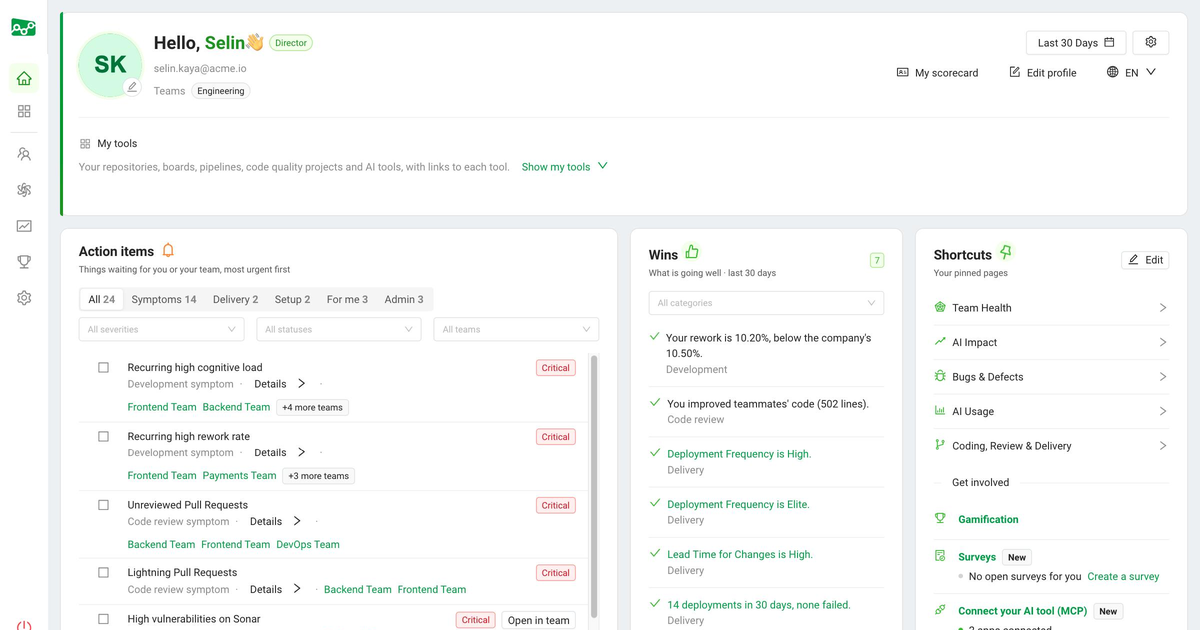
Oobeya 2.1 opens with a personal home page.
Until now, the first step in Oobeya was to decide where to look: a team scorecard, a dashboard, a report. The new home page turns that around. It shows what is waiting for you or your team, what is going well and where to go next, as soon as you sign in.

Shaped by your role
The home page follows the company role in your profile and the teams you lead.
- Developers see their own work: their coding activity, the quality of the code they changed, their wins and the symptoms of their team.
- Team leads see the teams they lead: symptoms, delivery and DORA metrics.
- Managers and directors see every team they lead across the organization, with DORA levels across teams and a table of each team.
- Administrators also see the setup items that need an administrator, such as data sources that fail their connection check, accounts that are not merged and Git analyses that failed.
Action items, most urgent first
Action items lists everything that needs attention, sorted by urgency and grouped into Symptoms, Delivery, Setup, For me and Admin. Filter by severity, status or team, open the details, and go straight to the page where you can fix it.
Each item also has your own status: Open, On it, Done or Won't fix, so you can keep track of your follow-up.
Wins, not only problems
Wins shows what is going well in the selected period: a coding efficiency that rose, a rework rate below the company average, an improved lead time, an Elite DORA level. Good news deserves the same visibility as the problems.
Everything you use, one click away
- My tools links to the repositories, boards, pipelines, code quality projects and AI tools of your teams.
- Shortcuts keeps your pinned pages one click away.
- Get involved points to Gamification, Surveys and connecting your AI tool through Oobeya MCP.
Further down, DORA levels across teams, Active symptoms, Wins and action items by area and My Organization summarize your teams.
Your page, your way
Choose the period for the whole page, from the last 7 days to the last year. Open Customize your homepage to turn off the sections you don't need or edit the layout.
The home page is also where you pick your language. Oobeya 2.1 is available in English, Turkish, Polish, Spanish and Brazilian Portuguese, and the change applies at once.

Getting started
The home page is available in Oobeya 2.1 for every user, with nothing to set up. Make sure each user's company role and teams are correct in Oobeya, so they see the right view.
Read the home page guide for every section, or see all Oobeya 2.1 changes. Want to see it on your own data? Schedule a demo.
Continue Exploring

Written by Emre Dundar
Emre Dundar is the Co-Founder & Chief Product Officer of Oobeya. Before starting Oobeya, he worked as a DevOps and Release Manager at Isbank and Ericsson. He later transitioned to consulting, focusing on SDLC, DevOps, and code quality. Since 2018, he has been dedicated to building Oobeya, helping engineering leaders improve productivity and quality.